


Prank Voice & Funny Sound FX
3.715.00 Reviews
App Specs
- Version
- 1.0.1
- Updated On
- License
- Free
- Downloads
- 100,000+
- Developer
- APSOFT HKT
- Categories
- Entertainment
- Platform
- Android
Screenshots
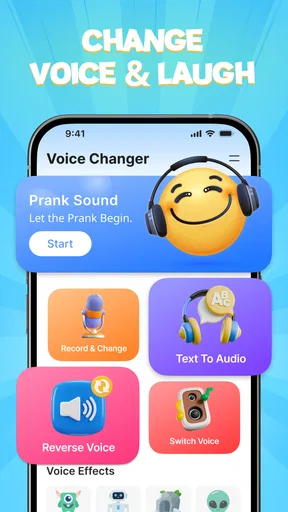
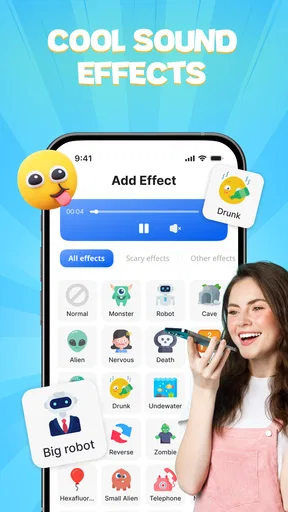
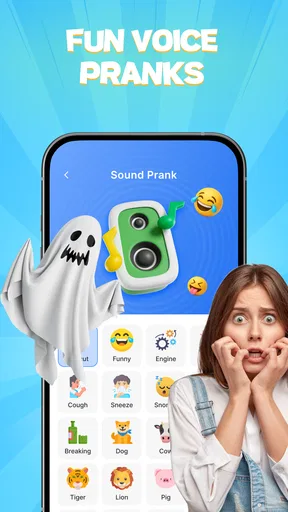
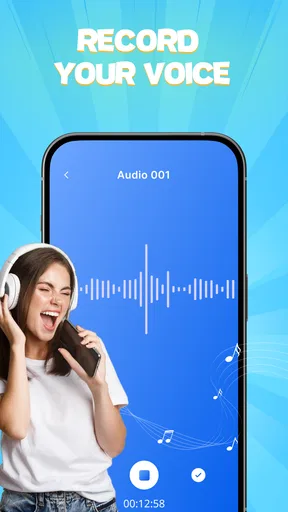
 Analysis by AppCompare
I judge a prank-sound app less by how outrageous its effects look on a screen and more by whether it helps me make a joke land without turning a friendly moment awkward. Prank Voice & Funny Sound FX is aimed at quick, playful entertainment: it combines sound effects with voice recording and modification, so I can either play a sound or make a clip of my own. That mix gives it more room for personal jokes than a soundboard alone, though it also means the best results depend on how thoughtfully I use it.
Start with the kind of joke you want to make
Before downloading a prank app, I’d ask myself whether I want a button-operated soundboard, a way to alter my own voice, or a more involved audio-editing tool. Those are different needs. A soundboard is usually quickest when the joke depends on a single effect at the right moment. A voice-modifying app is more useful when the joke relies on a spoken line that feels recognizably personal. This app’s appeal is that it brings those two approaches together rather than making me choose only one.
That flexibility matters in ordinary situations. If friends are swapping silly messages, I can record a short line, alter its sound, and share the result instead of sending a generic effect. If I’m trying to get a laugh across a room, a ready-made sound may be easier than recording anything. I would still keep the clip short and make sure the audience is in on the joke; a funny voice can be amusing between friends but confusing or irritating when it interrupts someone who has no context.
Where this app earns its place
The useful distinction here is between playing a gag and making one. Sound effects are immediate, while a recorded and modified voice gives me a chance to tailor the joke to a person or conversation. That makes the app a better fit for casual, low-stakes humor than for anyone looking for serious audio production. It is entertainment first, and I’d treat the recording tools as a way to create quick comic moments rather than polished voice work.
A practical tip is to record in a quiet spot and listen to the result before sharing it. Even a deliberately silly voice can become hard to understand if the original recording is muffled or surrounded by background noise. I’d also decide on the line before opening the recorder: a brief setup and punchline are easier to follow than a long improvised monologue. Those small choices make the result feel more like a joke and less like a test of an effect.
Who will enjoy it, and who may not
I can see this working especially well for people who like sending playful audio messages, adding a quick sound effect to a friendly gathering, or making a private joke with someone who enjoys this kind of humor. It may also suit a family setting where everyone is comfortable with silly voices and the person using the phone can keep the joke light. The app is free, and its Everyone content rating makes it approachable for a broad audience, but that does not mean every prank is appropriate for every person or setting.
I would skip it if I wanted a dependable tool for a public performance, professional voice-over, or careful sound editing. Those jobs call for more control over recording and final audio than I would expect from a small entertainment app. I’d also pass if I rarely share jokes by sound and mainly want music, podcasts, or a general-purpose recorder; in that case, a different category of app is likely to be more useful day to day.
Worth Reading Before You Choose

EA SPORTS FC Mobile 26 Is a Bigger Football Game, but It Takes Time

Flipboard Shows What News Apps Must Do Beyond the Feed

Switching to Android Auto Means Rethinking Your Driving Routine

Google Calendar Makes a Crowded Week Easier to Manage

Ludo King Makes the Most of the Minutes Between Plans

Baby Panda World Brings Quick Play to Modern Phones, but Its Game Library Feels Busy
First Impressions
Upon downloading Prank Voice & Funny Sound FX, I was greeted with a colorful and friendly interface. The app doesn’t beat around the bush; it gets straight to the fun stuff. I was immediately drawn to the wide array of categories ranging from classic fart sounds to unexpected animal noises. It’s like having a soundboard for every imaginable scenario, right in your pocket!
The app is super easy to navigate. Everything is laid out in a way that even the most tech-challenged among us can figure out. Plus, it’s available for both Android and iOS, so no one’s left out of the fun.
Diving into the Features
Now, let’s talk features. This app doesn’t just offer a basic selection of sounds. Oh no, it goes above and beyond with its voice changing capabilities. Yes, you heard it right! You can record your voice and transform it into something entirely different. Want to sound like a robot or perhaps a chipmunk? No problem! The voice changer is both intuitive and entertaining, perfect for pulling off those epic pranks.
Another cool feature is the ability to create playlists of your favorite sounds. This is particularly handy for those who want quick access during a prank session. Plus, the app allows you to set these sounds as ringtones or notifications. Imagine your phone ringing with a funny sound during a meeting—classic!
Making the joke work in real life
A realistic use for the playlist feature is preparing a few sounds before friends arrive, rather than searching while everyone is waiting for the punchline. I’d pick only the effects that fit the group, then keep the phone close and the volume at a considerate level. The trade-off is that planning makes a gag smoother but can also make it feel staged; for spontaneous humor, one well-timed sound is usually better than a long sequence.
For a voice clip, I’d try the effect privately first and check that the words remain understandable. If the altered voice makes the message impossible to follow, the effect has taken over from the joke. And before using a sound as a ringtone or notification, I’d consider where the phone is likely to ring. A gag tone that amuses me at home might be disruptive in a classroom, workplace, or quiet public place. These uses are fun precisely when the people nearby are comfortable with them.
Performance and Usability
As I played around with the app, I was pleased to find that it runs smoothly without any hiccups. The sounds load quickly, and there’s minimal lag, which is crucial when you’re trying to time a prank just right. The developers have done a great job ensuring that it is both reliable and efficient.
One thing I really appreciated was the lack of intrusive ads. While there are some ads present, they’re not overwhelming, allowing users to enjoy their pranking uninterrupted. If ads aren’t your thing, there’s an option to remove them with a small purchase.
Choosing it over other audio apps
Compared with a basic soundboard, the main reason I’d choose this app is the option to record and modify a voice as well as use effects. A simple soundboard may be preferable if I only need instant playback and want no recording step. On the other hand, a general audio editor is a better choice when I need detailed control over a recording rather than a quick laugh. The right option depends on whether I value speed, a personal voice gag, or editing precision most.
There is also a small switching cost if I move from a familiar soundboard: I need to find the effects I like, decide which ones are worth keeping in a playlist, and get comfortable with the recording flow. I’d start with a few favorites instead of trying to build a large collection at once. That keeps the app easy to use in the moment and helps me learn whether the voice-changing side is something I’ll actually use.
Practical limits and a sensible audience
Prank humor depends heavily on timing and trust, so the app cannot make every setting suitable. I would not use a startling effect to impersonate an emergency, mislead a stranger, or embarrass someone who has not agreed to join in. A joke should be easy to end once it stops being funny. That judgment is more important than having a large choice of sounds, especially when a recording could be forwarded beyond the original conversation.
For parents or anyone sharing a device with younger users, I’d try the app together and agree on where and when sound effects are okay. Its age classification is Everyone, but household expectations still matter, particularly for loud playback or recordings shared with others. People who want discreet, quiet entertainment may prefer to use it with headphones or choose a non-audio game instead.
What to expect before installing
The app is made by APSOFT HKT and sits in the entertainment category. It has a 3.7 average from around 239 ratings, with over 100K installs, so it has found an audience while leaving room for different experiences. It launched on March 12, 2026, and version 1.0.1 is listed for devices running Android 7.0 or later. Those details make it straightforward to check basic compatibility; they don’t change the practical point that this is best approached as a casual tool for jokes, not a serious audio workstation.
One question I’d consider is whether I need an internet connection for every use. I wouldn’t plan a live joke around an assumption about connectivity; I’d open the app beforehand, check that the sounds I want are ready, and avoid relying on anything I haven’t tested. Likewise, if I’m choosing it mainly to share recordings, I’d make a short test clip first and confirm that the result is easy to pass along in the way I intend. A quick trial prevents fumbling when someone is waiting to hear the punchline.
Another consideration is how much I want to customize. If I mainly want a quick laugh, I can stick to the effects and voice options that are already easy to reach. If I want careful trimming, layered tracks, or fine control over sound, I’d choose an editor designed for that work instead. This distinction helps set expectations: the app’s strength is lowering the effort needed for playful audio, not replacing more capable creative tools.
Final Thoughts
All in all, this is a delightful app that delivers exactly what it promises—a barrel of laughs and endless pranking opportunities. Whether you’re looking to liven up a party or simply want to have some fun with friends, this app is a must-have. It’s user-friendly, packed with features, and most importantly, it’s incredibly fun.
If you're in the mood for some light-hearted mischief, give it a try. You won’t be disappointed! And who knows, you might just become the ultimate prankster in your circle. Happy pranking!
My recommendation is more measured than calling it essential: I’d try it if I enjoy sound-based jokes and want both quick effects and playful voice recordings in one place. I’d choose a simpler soundboard for instant playback alone, or a full audio editor when precision matters more than speed. For a casual group chat or a relaxed get-together, the mix can be genuinely entertaining; for work, public pranks, or anyone who dislikes being recorded, it is not the right fit. Used with a little restraint, it is an easy way to add a personal touch to a joke.
Pros
- Wide variety of sound effects available.
- User-friendly interface for easy navigation.
- High-quality audio outputs for pranks.
- No need for an internet connection.
- Customizable sound settings for personalization.
Cons
- Contains ads that can disrupt usage.
- Limited free sound options available.
- Some effects require in-app purchases.
- Occasional app crashes reported by users.
- Updates can be infrequent.
FAQs for Prank Voice & Funny Sound FX
What features does Prank Voice & Funny Sound FX offer?
Prank Voice & Funny Sound FX offers a variety of features including voice modulation, sound effects, and pre-recorded prank scenarios. Users can easily change their voice to sound like a robot, alien, or even a celebrity. Additionally, the app includes a library of funny sound effects to enhance your prank experience.
Is Prank Voice & Funny Sound FX free to use?
The app is available for free with limited features. However, to access the full range of voice effects and sound libraries, users can purchase a premium subscription. This subscription also removes ads, providing a more seamless experience. Check the app store listing for detailed pricing information.
Can Prank Voice & Funny Sound FX be used offline?
Prank Voice & Funny Sound FX requires an internet connection to download new sound effects and updates. However, once the effects are downloaded, they can be used offline. This allows users to enjoy pranking even without active internet access, as long as the sounds are pre-loaded.
Is Prank Voice & Funny Sound FX safe for children?
The app is designed for entertainment and is generally safe for all ages. However, it contains ads and in-app purchases, so parental guidance is recommended for younger users. Parents should also review the content to ensure it aligns with their comfort level regarding pranks and humor.
How can I share my pranks using Prank Voice & Funny Sound FX?
Users can easily share their recorded pranks through social media platforms, messaging apps, or email directly from the app. Simply select the prank you want to share and choose the platform. The app provides seamless integration with most popular sharing services, making it easy to spread the laughter.


